
Rollback Strategies for Database Migration Failures
Database rollbacks are much harder than application rollbacks. Why? Because databases store persistent, evolving data, and reversing changes can lead to data loss, downtime, or corruption. Key takeaway: Every migration plan must include a rollback strategy to avoid chaos during failures.
Here’s what you need to know:
- Why rollbacks are challenging: Database changes involve state, unlike code rollbacks. Partial updates, dropped tables, or user data added during migrations can complicate recovery.
- Common failure causes: Human errors, schema mismatches, performance issues, or legacy system conflicts often derail migrations.
- Rollback strategies: Use backups, transactional rollbacks, or blue-green deployments. Each has trade-offs in speed, complexity, and data safety.
- Automation and testing: Automate rollback processes in CI/CD pipelines and conduct regular fire drills to ensure readiness.
- Data integrity matters: Losing data is rarely acceptable. Rollbacks must prioritize preserving user transactions and maintaining compliance with regulations like GDPR.
A well-prepared rollback plan saves time, money, and trust. Skipping this step can cost organizations over $100,000 per hour of downtime. Let’s explore how to plan and execute rollbacks effectively.
Database Migration Failures and Rollback Requirements
Why Database Rollbacks Are Harder Than Application Rollbacks
The core issue with database rollbacks lies in one critical factor: state. Unlike application rollbacks, which involve swapping out code - essentially a stateless process - databases deal with persistent data that’s constantly evolving. This makes rollbacks much more complex.
When a migration fails mid-process, it often leaves the database in an inconsistent state, especially in systems without transactional DDL support. Some tables may only be partially updated, and certain changes, like dropping a table or column, are permanent - recovering from these requires a full backup restore. To complicate matters, any legitimate user data written after the migration begins but before the rollback is executed may be lost. This creates a tough decision: do you prioritize system stability at the cost of losing recent user transactions, or risk further inconsistency by trying to preserve new data?
Common Database Migration Failure Scenarios
Statistics reveal that 90% of IT leaders have faced failures during database migration projects. The reasons behind these failures are often predictable but still devastating:
- Human error: This includes accidental deletions, incorrect mass updates, or unintended schema changes that ripple through the system.
- Schema mismatches: When new column types or removed fields don’t align with application code, it can break existing services.
- Performance regressions: Migration scripts may lock entire tables, block replication, or consume excessive resources, slowing the system to a crawl.
- Data corruption: Migrations can leave records in inconsistent states, causing a disconnect between what the application expects and the database’s actual state.
- Legacy system integration: Old APIs may fail to handle updated data formats, external services might time out under migration loads, or replication delays could lead to hours-long data lags.
These scenarios highlight the importance of having precise rollback plans that account for potential pitfalls.
Rollback Objectives and Constraints
To address these challenges, rollback plans must aim to recover quickly while maintaining data integrity. The main goals include reducing downtime, preventing data loss, and ensuring referential integrity. However, achieving these objectives often involves trade-offs. For example, a quick rollback might rely on restoring an old backup, but this approach erases all user activity since the migration began. On the other hand, preserving data might require painstaking script execution, which could leave the system partially operational for hours.
There are also technical and regulatory constraints to consider. Some database engines don’t allow rolling back DDL changes within transactions, requiring idempotent scripts that carefully check the database's current state before making changes. Additionally, compliance regulations like GDPR or HIPAA demand detailed audit trails, which can make "roll forward" strategies - deploying a new version that fixes issues while keeping the system online - a better option than traditional rollbacks.
As Kendra Little from Redgate points out:
"Data loss is almost always unacceptable as part of the default rollback strategy - it is usually a worst-case scenario and most want to avoid it entirely".
Even technical factors like table size can make rollbacks a logistical nightmare. For instance, backfilling a 50-million-row table at 50,000 rows per second would take at least 20 minutes under ideal conditions. However, real-world factors like indexing and replication delays often stretch this process to several hours. Every minute spent in recovery mode means lost revenue, unhappy users, and mounting pressure to make the right decision under intense scrutiny.
The Hard Truth About GitOps and Database Rollbacks - Rotem Tamir, Ariga
Building Blocks for Database Rollback Strategies
Having the right infrastructure in place is crucial to avoid scrambling when things go wrong. Below, we break down the key components of an effective rollback strategy.
Backups, Snapshots, and Point-In-Time Recovery (PITR)
Reliable backups are the backbone of any rollback plan. As Redgate Flyway wisely points out:
"Rollback scripts (aka undo scripts) are no substitute for having a robust backup/restore strategy".
When dealing with destructive changes, like dropping tables, a full backup restore is often the only way forward.
Traditional backup-and-restore methods can be time-consuming, sometimes taking hours to restore a database cluster from a snapshot. This is where Point-In-Time Recovery (PITR) proves invaluable. By combining base backups with continuous transaction logs, PITR lets you restore a database to a precise moment - down to the millisecond. This level of precision is especially helpful when recovering from human errors like accidental deletions or incorrect updates during migrations.
For those using cloud platforms like Amazon Aurora, features like Backtrack offer a quicker alternative. Backtrack can rewind a cluster in minutes, but it has a 72-hour limit and must be enabled at the time of cluster creation. Bob Walker, Field CTO at Octopus Deploy, reminds us:
"Restoring database backups should be a last resort. It's not the default option. Only do it when a catastrophic error occurs and there's no other option".
If you're using logical replication for rollback strategies - like in Blue/Green deployments - specific configurations are required. Binary logging must be enabled with the format set to ROW or MIXED, and the retention period should cover the migration window (at least 24 hours, though Aurora MySQL allows up to 90 days). Additionally, tables need a replication identity, such as a primary key, to ensure proper synchronization. Before rolling back to a synchronized cluster, confirm that Seconds_Behind_Master is zero to avoid data loss.
Versioned Migrations and Rollback Scripts
Version control is critical for managing database migrations. Keeping migration scripts, schemas, and configuration files in Git provides a detailed history and allows you to revert to a stable state when needed. However, rollback scripts have their limits - irreversible changes, like dropping tables or columns, can't be undone with scripts alone.
One way to address this is by using an Expand/Contract strategy, also known as Parallel Change. This involves deploying backward-compatible database changes ahead of code updates, creating a buffer that preserves the existing schema during a rollback. As Sumit Kumar, Senior Software Engineer, cautions:
"If your rollback plan requires reversing a migration under pressure, you already lost".
Automation and Observability for Rollback Readiness
Automation and observability are key to ensuring rollbacks are swift and effective.
Automation minimizes human error and ensures reliability doesn't take a backseat to speed. Automated CI/CD pipelines can detect rollback deployments and skip database migration steps, preventing the re-execution of destructive scripts.
Observability, on the other hand, provides the insights needed to catch issues early. Monitoring metrics like replication lag, table locks, and query performance can trigger automated rollbacks before major damage occurs. As Harness explains:
"Automation is the foundation of any DevOps practice. Applying this to database rollbacks can mitigate risk and reduce the time spent resolving incidents".
But theory alone isn't enough. Testing is where plans meet reality. Ispirer Systems puts it plainly:
"A rollback strategy on paper is pure fiction, and it gains substance and credibility only through relentless testing".
Use staging environments that mimic production to simulate failure scenarios - like halting a service mid-process - to validate recovery times and identify manual steps that could be automated. Regular "game days" train your team and tools to handle high-pressure situations effectively.
Platforms like Kanu AI take rollback readiness a step further. They automate infrastructure provisioning and perform over 250 validation checks on live systems. Kanu’s DevOps Agent generates infrastructure code (Terraform, CDK, CloudFormation) and maintains a comprehensive audit trail with rollback support. Meanwhile, its QA Agent analyzes logs and metrics to flag potential issues before they escalate. By integrating seamlessly with GitHub or GitLab and operating within your cloud accounts, Kanu ensures rollback processes are not only functional but also compliant with enterprise standards like SOC 2 Type II. These practices reduce downtime and data loss, aligning perfectly with the goal of a resilient rollback strategy.
Database Migration Rollback Strategies
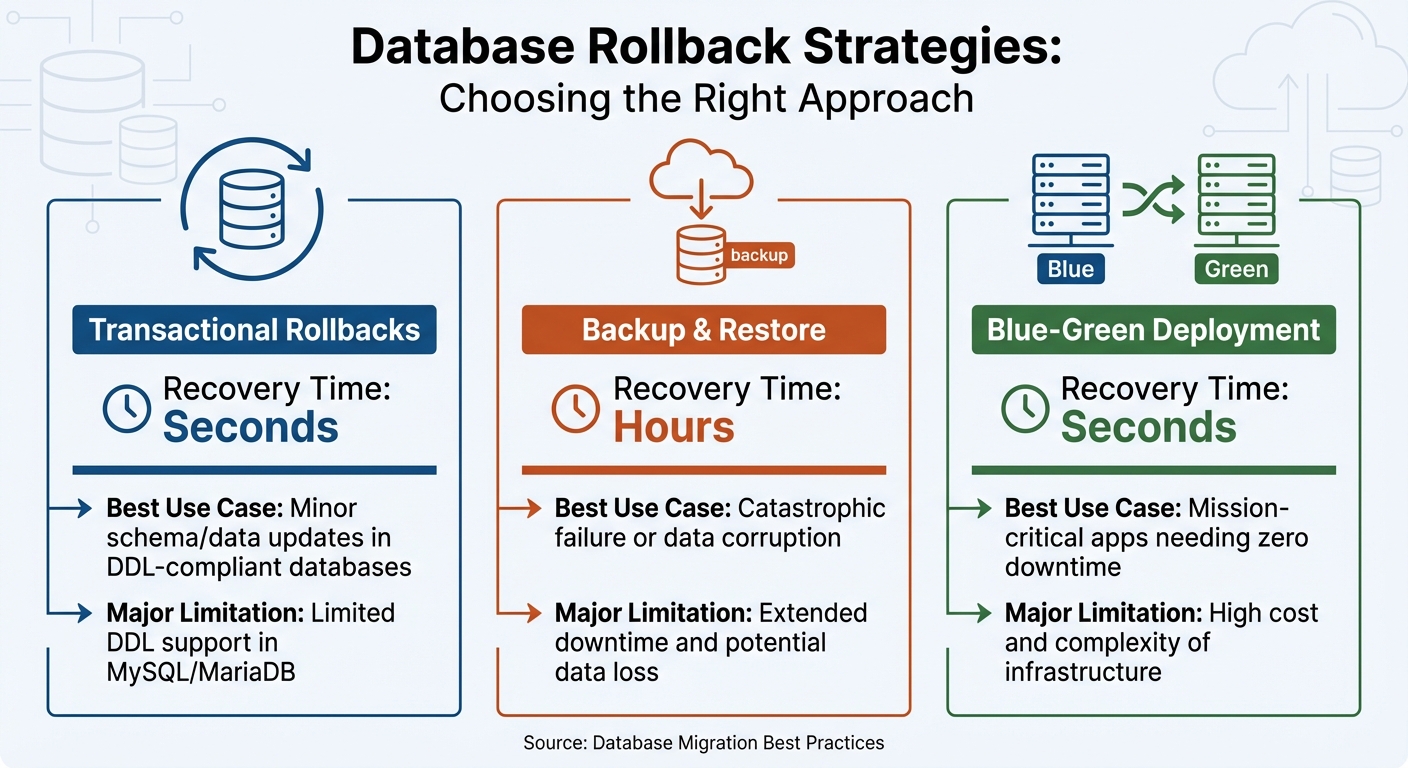
Database Rollback Strategies Comparison: Recovery Time and Use Cases
Once you've established a solid foundation with backups, versioned migrations, and automation, the next step is choosing a rollback strategy that suits your needs. Each approach has its own balance of speed, complexity, and data safety. Below, we'll break down the main rollback strategies, their trade-offs, and ideal use cases.
Transactional rollbacks are ideal for smaller, isolated changes. If your database supports transactional DDL - like PostgreSQL or SQL Server - you can wrap schema changes in a transaction, which automatically reverts if something goes wrong. However, databases like MySQL and MariaDB don't support most transactional DDL operations. As Redgate points out:
"Relying solely on rollback scripts is not on its own a viable strategy as certain changes, such as table or column drops cannot be recovered directly, and will require a backup to be restored".
For databases without transactional DDL, you'll need idempotent scripts. These scripts check for the existence of objects before attempting to revert changes, ensuring smoother rollbacks.
Backup-and-restore rollbacks act as a safety net for severe failures. If critical data is corrupted or lost, restoring from a backup might be the only solution. However, this method comes with a hefty downside: extended downtime, often lasting hours, and the loss of any data added after the last backup. Because of these drawbacks, this approach is best reserved as a last resort.
Blue-Green deployments involve maintaining two identical environments - one current (blue) and one new (green). Traffic is only switched to the new environment after thorough validation. If issues occur, traffic can be redirected back to the original environment, minimizing downtime to nearly zero. The trade-off here is the expense of maintaining duplicate infrastructure and the challenge of keeping both environments perfectly synchronized.
Here’s a quick comparison of these strategies:
| Strategy | Recovery Time | Best Use Case | Major Limitation |
|---|---|---|---|
| Transactional | Seconds | Minor schema/data updates in DDL-compliant databases | Limited DDL support in MySQL/MariaDB |
| Backup & Restore | Hours | Catastrophic failure or data corruption | Extended downtime and potential data loss |
| Blue-Green | Seconds | Mission-critical apps needing zero downtime | High cost and complexity of infrastructure |
For more complex changes, consider the Expand-Migrate-Contract pattern. This method involves adding new schema elements as nullable columns (Expand), gradually migrating data (Migrate), and removing old structures only after ensuring they’re no longer in use (Contract). This approach keeps your database backward-compatible throughout the process, giving you more time and flexibility to roll back if needed. It’s a practical option when traditional rollback methods don’t fully address your needs, reinforcing the importance of having a well-thought-out rollback plan.
sbb-itb-3b7b063
Integrating Rollback Into Cloud Migration Pipelines
Planning for rollbacks should be part of your workflow from the very beginning. Incorporating database migrations into an automated pipeline improves consistency, speeds up processes, and ensures your rollback strategy is reliable when needed. The trick is to treat rollbacks as essential components of your CI/CD process. In fact, research suggests this approach can lower production incidents by up to 62%. Below, we’ll explore how embedding rollback plans in CI/CD pipelines, using Infrastructure as Code (IaC), and leveraging AI-driven insights can simplify recovery efforts.
Embedding Rollback Plans in CI/CD Pipelines
To make rollbacks seamless, your migration and rollback scripts should be stored in the same repository as your application code. They should also be version-synced and ready for automated execution. Tools like Flyway and Liquibase can help by managing versioned migrations that are executed during each deployment. The key step here is to include health check gates that verify database connectivity and other critical dependencies before finalizing the deployment.
Automated rollback triggers and instant notifications to your team can make recovery faster and less stressful. For containerized setups, Kubernetes simplifies this process with commands like kubectl rollout undo, which reverts deployments to an earlier state if readiness probes fail. As Nawaz Dhandala aptly puts it:
"A failed deployment at 2 AM is stressful. A failed deployment without rollback automation is a disaster."
When rollbacks are triggered, notify your team through designated channels immediately. Additionally, run quarterly "fire drills" in production-like environments to test your rollback scripts under realistic conditions.
Infrastructure as Code for Rollback Automation
Infrastructure as Code (IaC) tools like Terraform and CloudFormation act as your single source of truth, making it easier to return to a stable state while minimizing the impact of migration failures. Effective state management is critical in these scenarios. Before starting a migration, back up your Terraform state file using terraform state pull, along with your configuration files and the current Git commit hash. This ensures you can restore the exact infrastructure setup if something goes wrong.
Storing Terraform state in versioned backends allows for quick restoration during rollbacks. Features like "moved blocks" and "import blocks" in modern IaC tools let you preview state changes before executing them, reducing the risks associated with manual operations. These safeguards set the foundation for integrating AI platforms that take rollback readiness to the next level.
Using AI Platforms for Automated Rollback Insights
AI platforms are revolutionizing rollback strategies by building on CI/CD and IaC practices. Tools like Kanu AI analyze historical incident patterns and real-time anomalies to identify potential migration failures before they escalate. Instead of waiting for a complete failure, machine learning models can evaluate deployments and automatically trigger rollbacks, helping you recover before the problem worsens.
Kanu AI employs three specialized agents - Intent Agent, DevOps Agent, and QA Agent - to validate changes throughout the deployment process. These agents perform over 250 validation checks on live systems, analyzing logs and metrics to provide actionable insights. This helps teams achieve quicker "Mean Time to Confidence" during recovery. The platform can automatically detect unhealthy states by monitoring health endpoints that validate critical dependencies, such as database and cache connectivity. Rollbacks can then be triggered based on specific metrics like error rate spikes or latency increases.
Kanu goes further by generating both application and infrastructure code, maintaining audit trails, and supporting rollback actions. It integrates seamlessly into existing CI/CD workflows while performing root cause analysis after a rollback. This continuous feedback loop helps refine future migration pipelines, making your rollback strategy more effective over time.
Operational Practices and Governance for Safe Rollbacks
Rollback Decision Criteria and Approval Processes
Deciding when to initiate a rollback is a critical step in incident management. To avoid confusion during stressful situations, organizations need to define clear and measurable criteria. For example, technical failures like an application failing to start, users being unable to log in, or missing critical configurations are clear signals to consider a rollback. Performance issues, such as a drop in system health scores, failed automated health checks, or slower query performance detected through real-time monitoring, are also common triggers. Another major red flag is data integrity problems, such as invalid data entries or blank reports.
Teams must weigh whether resolving the issue by moving forward would take longer than meeting their Mean Time to Recovery (MTTR) targets. A structured three-tier approval process can streamline decisions: automated health checks at the system level, manual confirmation by the team through secure communication channels, and a leadership-level assessment of the business impact. This approach is especially important given that 98% of organizations report that just one hour of downtime can cost over $100,000.
Creating an incident taxonomy with MTTR goals based on severity can further clarify decision-making. For instance:
- Critical incidents: Recovery within 15 minutes, with direct communication to the CEO or Site Reliability Engineering (SRE) teams.
- High-severity incidents: Recovery within 60 minutes, involving engineering leadership.
- Medium-severity incidents: Recovery within 4 hours, with updates provided via team communication channels.
As QA Brains aptly states:
"A robust rollback strategy isn't optional - it's your digital lifeline".
By establishing these criteria, teams can lay a solid groundwork for effective testing and verification processes.
Testing Rollbacks Through Game Days and Simulations
A rollback plan is only as good as its execution, and execution improves through practice. Quarterly "rollback fire drills" in production-like environments are a proven way to prepare teams for real-world scenarios. These drills should test every aspect of the rollback process, including technical scripts, communication workflows, approval processes, and post-rollback verification.
During these simulations, teams should ensure that older application versions can still access secret stores, verify that credentials remain valid, and confirm there’s no "cross-talk" between older user interfaces and newer APIs in Single Page Application (SPA) setups. It's equally important to check that Infrastructure as Code (IaC) configurations align with the requirements of the rolled-back version to avoid misconfigurations.
A great example of an effective rollback strategy in action comes from 2023, when a major media company deployed a CMS update that disrupted their video streaming API. Thanks to a pre-planned blue/green rollback strategy, errors were identified within 90 seconds using synthetic monitoring, and traffic was rerouted to a stable environment in just 4 minutes and 22 seconds. This quick response saved the company an estimated $2.3 million in revenue. Their success highlights the importance of regular testing, which not only ensures technical readiness but also builds team confidence for quick decision-making during live incidents.
Post-Rollback Verification and Compliance Audits
Once a rollback is complete, the next step is to verify system stability and ensure compliance. This phase focuses on achieving Mean Time to Confidence (MTTC) - the time it takes to confirm that the system has returned to a stable and functional state. Automated validation checks, such as smoke tests, database schema compatibility checks, and encryption key status reviews, are essential tools for this process.
For stateful services, data reconciliation is a key part of verification. Teams can use database flashback queries to examine previous states, sample rows to identify error rates, and monitor for inconsistencies in dual-write systems. Real-time telemetry, including error rates, performance metrics, and user logs, provides a more accurate picture of system health than relying solely on script execution results. This is crucial because 81% of customers report abandoning a brand after just three negative digital experiences.
From a compliance perspective, maintaining detailed audit logs of all changes and rollbacks is non-negotiable in industries like finance and healthcare. In many cases, rolling forward (applying a new migration to reverse changes) is preferred over rolling back, as it creates a clear audit trail of every deployment state. After the rollback is verified, teams should update version control to reflect the current production state and document lessons learned to improve future processes.
As Saurav Singh, a Data Engineer, emphasizes:
"A good rollback strategy is what separates panic from professionalism".
Conclusion
Every step in a rollback strategy - planning, automation, testing, and governance - plays a crucial role. Database rollbacks, unlike application rollbacks, come with unique challenges due to persistent storage complexities. For every forward migration script, there should be a corresponding rollback script that's developed and thoroughly tested alongside it. Skipping rollback planning can lead to costly consequences, with 98% of organizations reporting potential losses exceeding $100,000 per hour during downtime.
Automation makes the rollback process consistent and efficient. By integrating rollback procedures into CI/CD pipelines, teams can cut Mean Time to Recovery from hours to mere minutes, or even seconds. Automated validation gates add another layer of security, checking for schema compatibility, encryption, and environmental drift. Tools like automated canary analysis and feature flags have shown impressive results, reducing rollback occurrences by 88% and 92%, respectively. Additionally, regular fire drills in environments that mimic production help uncover hidden issues before they escalate.
Rolling forward often proves safer than rolling back. Addressing issues with a new migration maintains a clean audit trail for compliance and minimizes risks of data loss. This method not only supports compliance requirements but also aligns with the goal of minimizing downtime and protecting data. The Expand/Contract pattern further reduces risk by ensuring changes are backward-compatible, allowing older application versions to function seamlessly even after database updates.
As Bob Walker, Field CTO at Octopus Deploy, aptly states:
"Unless a catastrophic event happens, data loss is unacceptable. Data loss has real-world impacts".
A well-executed rollback strategy ensures rapid recovery, maintains data integrity, and builds long-term customer trust. Platforms like Kanu AI can simplify this process by automating rollback insights and optimizing cloud migration workflows.
FAQs
When should I roll back vs. roll forward?
When it comes to database recovery, there are two key approaches: rolling back and rolling forward. Rolling back is all about returning the database to a previous stable state. This method is particularly useful for handling critical issues like system crashes or data corruption. It's most effective when the changes leading up to the issue are non-destructive, making it easier to restore functionality.
On the other hand, rolling forward focuses on applying fixes to progress the database to a stable state. This approach works well when you need to preserve data integrity or resolve problems in complex systems without losing valuable updates.
The choice between these methods depends on factors like the type of failure, the importance of data safety, and your overall recovery plan.
How do I avoid losing writes during a rollback?
To avoid losing data during a rollback, focus on maintaining data integrity with tools like pre-migration backups, transaction logs, snapshots, or point-in-time recovery. These methods ensure you can reverse changes accurately without impacting any recent writes.
It's also important to have a well-thought-out rollback plan. This includes using version control, automated scripts, and conducting thorough testing beforehand. These steps reduce risks and help you restore a stable system quickly. For high-stakes updates, consider manual rollbacks or leveraging database features like flashback queries to handle reversals effectively.
Which rollback strategy fits my migration best?
The right rollback strategy hinges on your specific needs and how much risk you're willing to accept. One widely used method is the "expand, migrate, contract" approach. This strategy is designed with failure in mind, incorporating backward compatibility, feature flags, and thoroughly tested rollback scripts at every stage.
In high-stakes environments, it's crucial to take extra precautions. Pairing pre-deployment testing, automated rollback processes, and a reliable backup/restore plan can make all the difference. This is especially important when dealing with irreversible changes, such as dropping database tables or columns.