Best Practices for Observability in Multi-Cloud GitOps
Modern cloud setups are complex, often spanning AWS, Azure, Google Cloud, and on-premise systems. GitOps simplifies managing these environments by using Git as the source of truth for infrastructure and applications. But without observability, GitOps workflows can become opaque, making it hard to diagnose issues or prevent system drift.
Here’s what you need to know:
- Observability vs. Monitoring: Monitoring tells you something is broken; observability helps you understand why and how to fix it.
- Multi-Cloud Challenges: Diverse tools, fragmented data, and network complexity make managing observability across clouds difficult.
- Unified Observability Stack: Use OpenTelemetry, Prometheus, Thanos, Grafana Loki, and Jaeger for logs, metrics, and traces. Centralize data collection and standardize formats.
- GitOps Specific Monitoring: Focus on metrics from Argo CD or Flux CD controllers to track sync status, reconciliation times, and drift detection.
- Automation and Policies: Store configurations in Git, validate them with Open Policy Agent (OPA), and automate rollouts using ArgoCD or FluxCD.
- Security and Resilience: Secure monitoring credentials, enable mTLS, and use tools like HashiCorp Vault to manage secrets.
Key takeaway: Observability ensures GitOps workflows are transparent and manageable, even in multi-cloud environments. Centralizing and standardizing your observability tools is critical for maintaining system health, reducing downtime, and preventing configuration drift.
Unlocking Multi-Cloud Observability: The Case Study of...- Francesco Cultrera, Armagan Karatosun
Building an Observability Stack for Multi-Cloud GitOps
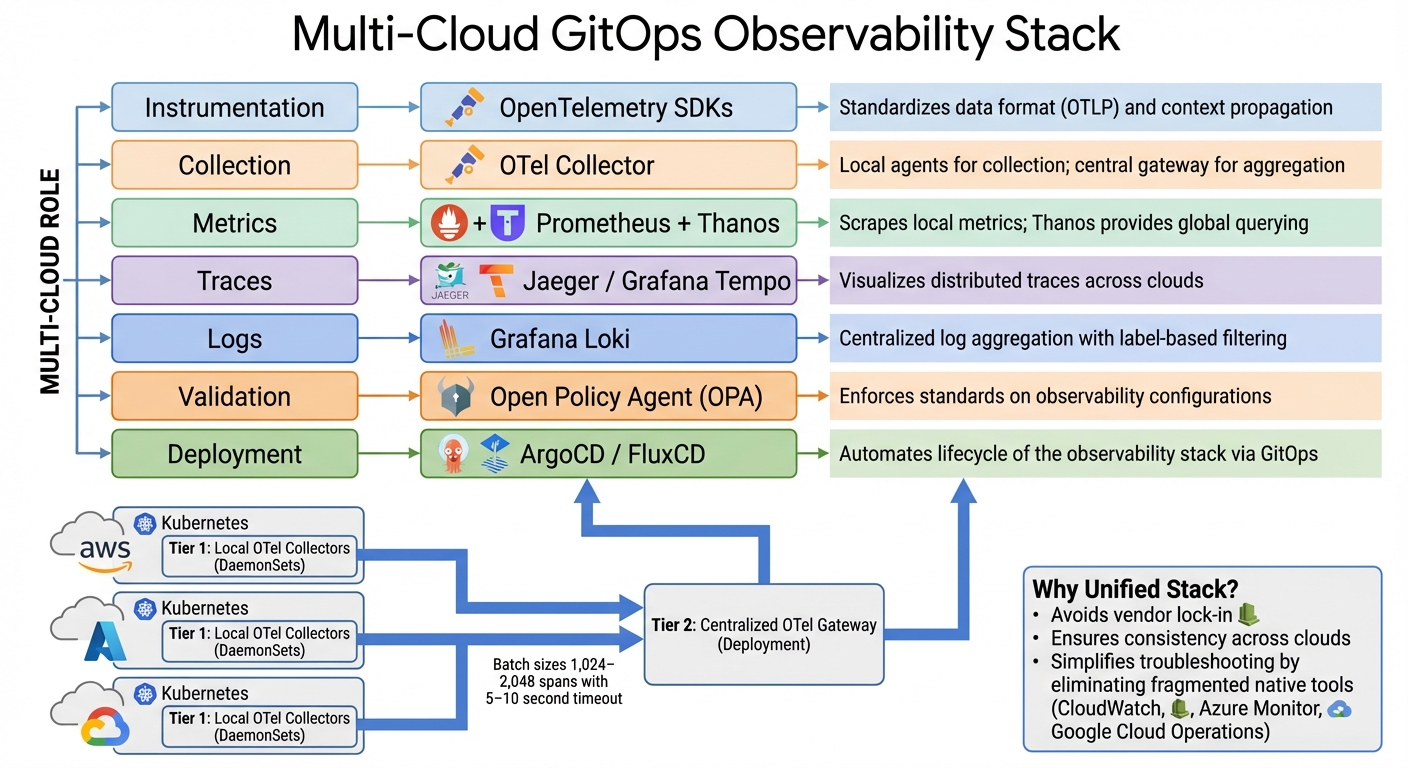
Multi-Cloud GitOps Observability Stack: Recommended Tools and Components
Tackling fragmented tools and complex networks starts with creating a streamlined observability stack. A robust multi-cloud GitOps observability setup hinges on standardization. One common mistake is relying on each cloud provider's native monitoring tools - like AWS CloudWatch, Azure Monitor, or Google Cloud Operations. This scattered approach complicates troubleshooting. Instead, adopting OpenTelemetry (OTel) as a unified standard for collecting logs, metrics, and traces helps maintain consistency across environments. With OTel SDKs, you ensure uniform service naming and context propagation. For example, when a request moves from an AWS Lambda function to a Google Kubernetes Engine cluster, the trace remains intact, avoiding the fragmentation issues described earlier.
A two-tier collector model works best for this architecture. Deploy local OTel Collectors as DaemonSets on Kubernetes clusters to collect telemetry data near its source. These agents forward the data to a centralized OTel Gateway (running as a Deployment) for aggregation, processing, and routing. This setup keeps local clusters lightweight while providing centralized control for sampling, filtering, and enrichment. To optimize cross-cloud network efficiency, configure batch sizes between 1,024–2,048 spans with a 5–10 second timeout.
"A bad configuration change can cause data loss, increased latency, or even collector crashes. Managing this configuration through manual edits... is risky and unscalable." – Nawaz Dhandala, OneUptime
To avoid these risks, manage your observability stack using GitOps practices. Store OTel Collector configurations in Git, validate them with Open Policy Agent (OPA) during CI pipelines to catch errors before deployment, and automate rollouts with ArgoCD or FluxCD. For instance, OPA policies can enforce the inclusion of a memory_limiter processor in production pipelines or require TLS for all OTLP receivers to secure data across clouds.
Tools for Logs, Metrics, and Traces
For metrics, Prometheus remains a top choice in Kubernetes environments. It scrapes local metrics from GitOps controllers and application pods. However, Prometheus alone is limited to single-cluster setups. Tools like Thanos or Cortex extend its capabilities, enabling federated querying and long-term storage by aggregating data from multiple Prometheus instances into a unified interface.
For distributed tracing, Jaeger or Grafana Tempo integrate seamlessly with OpenTelemetry to visualize request flows across cloud boundaries. Implementing W3C Trace Context (using traceparent and tracestate headers) ensures trace continuity across services in different clouds. Without this, traces can break at cloud boundaries, leaving you with incomplete visibility.
Grafana Loki is ideal for log aggregation, offering cost-effective, long-term retention with S3-backed storage. Instead of indexing every detail, Loki focuses on metadata labels like cloud.provider, cloud.region, and k8s.cluster.name. Use the resourcedetection processor in OTel Collectors to automatically tag telemetry with these attributes, simplifying cross-cloud filtering without manual effort.
| Component | Recommended Tool | Multi-Cloud Role |
|---|---|---|
| Instrumentation | OpenTelemetry SDKs | Standardizes data format (OTLP) and context propagation |
| Collection | OTel Collector | Local agents for collection; central gateway for aggregation |
| Metrics | Prometheus + Thanos | Scrapes local metrics; Thanos provides global querying |
| Traces | Jaeger / Grafana Tempo | Visualizes distributed traces across clouds |
| Logs | Grafana Loki | Centralized log aggregation with label-based filtering |
| Validation | Open Policy Agent (OPA) | Enforces standards on observability configurations |
| Deployment | ArgoCD / FluxCD | Automates lifecycle of the observability stack via GitOps |
With these tools in place, focus shifts to ensuring secure and resilient monitoring across cloud boundaries.
Setting Up Cross-Cloud Monitoring
Once data collection is standardized, the next step is ensuring reliable and secure monitoring across clouds. Since network connectivity can be unpredictable, configure the file_storage extension in OTel Collectors to buffer telemetry data locally when the central backend is unreachable. This prevents data loss during temporary outages.
Tail-based sampling is another critical strategy for managing data volume without compromising on important signals. Instead of sampling at the source - where error traces might be dropped - perform sampling at the central gateway. Use the tail_sampling processor to retain 100% of error traces and high-latency requests (e.g., those exceeding 2,000ms) while sampling routine traffic at 10%. This ensures that crucial traces for troubleshooting are preserved.
For GitOps-specific monitoring, track metrics from ArgoCD components. Metrics like argocd_app_info can be used to alert on OutOfSync or Degraded application states across clusters. The OTel Collector itself also exposes internal performance metrics at /metrics on port 8888, allowing you to monitor the health of your observability stack just like any other workload.
"Multi-cluster telemetry takes more upfront work than single-cluster, but it is essential for running a reliable multi-cluster mesh." – Nawaz Dhandala, OneUptime
Centralize alerting by routing all alerts to a single Alertmanager instance with explicit routing logic. Consolidating alerts helps prevent duplicate notifications and provides a unified view of incidents, whether they originate from AWS, Azure, or Google Cloud. The ultimate goal is a single pane of glass for querying, visualizing, and alerting on telemetry across environments, eliminating the need to switch tools or contexts. These practices lay the groundwork for effectively monitoring GitOps workflows in a multi-cloud setup.
Monitoring GitOps Workflows
Once your observability stack is set up, it's time to focus on monitoring both the GitOps control plane and its connectivity to remote clusters. In multi-cloud setups, a hub-spoke architecture is often used. Here, a central "Hub" cluster runs the GitOps control plane (using tools like Argo CD or Flux), while "Spoke" clusters across various cloud accounts handle the workloads. This approach builds on the observability setup by emphasizing the tools and metrics needed to keep a close eye on GitOps workflows.
Instead of treating the GitOps process as a black box, monitor specific components of your GitOps controllers. For Argo CD, this includes the Application Controller, API Server, and Repo Server. For Flux CD, focus on the Source Controller, Kustomize Controller, and Helm Controller, which typically expose metrics on port 8080. These components provide Prometheus metrics that reflect the different stages of deployment.
"Monitoring ArgoCD with OpenTelemetry gives you deep visibility into your GitOps deployment process... turning ArgoCD from a fire-and-forget deployment tool into a fully observable part of your infrastructure." – Nawaz Dhandala, OneUptime
To go beyond basic metrics, you can instrument GitOps sync operations as OpenTelemetry spans via webhooks or event watchers. This lets you track the duration and success of individual deployment cycles, offering precise timing data for every reconciliation.
Keeping an Eye on Git Operations
Git operations play a crucial role in reconciliation performance. Issues like Git server latency or rate limiting can directly affect how quickly changes are applied. Generally, Git operations should complete in under 10 seconds. If the 95th percentile (P95) latency exceeds 30 seconds, it’s a sign of potential trouble.
Tracking GitOps Controllers and Reconciliation
To monitor GitOps controllers effectively, start by deploying ServiceMonitors using the Prometheus Operator's ServiceMonitor or PodMonitor CRDs. These automate the discovery and scraping of GitOps controller endpoints. A scrape interval of 30 seconds balances resolution with system load.
Here’s a quick look at key metrics to track in multi-cloud GitOps setups:
| Metric Name | Controller | What It Tracks |
|---|---|---|
argocd_app_info |
Argo CD | Current sync and health status of applications |
gotk_reconcile_duration_seconds |
Flux CD | Reconciliation duration histogram |
argocd_git_request_total |
Argo CD | Count of Git operations (fetch, ls-remote) |
gotk_reconcile_condition |
Flux CD | Current condition (Ready/Healthy) of reconciled resources |
argocd_repo_server_request_duration_seconds |
Argo CD | Time spent generating manifests (Helm/Kustomize) |
Metrics like argocd_app_info (Argo CD) and gotk_reconcile_condition (Flux CD) are essential for tracking the health and sync status of applications across clusters. For example, applications flagged as OutOfSync or Degraded should be investigated immediately. Reconciliation latency is another key indicator - metrics such as argocd_app_reconcile (Argo CD) or gotk_reconcile_duration_seconds (Flux CD) can reveal delays in comparing the desired state with the live state. If P95 latency exceeds 30 seconds, it’s worth checking for bottlenecks, whether they stem from resource constraints or external network issues.
Multi-cloud environments require extra vigilance. Monitor argocd_cluster_connection_status to spot network or authentication failures between the hub and spoke clusters.
"The repo server is often the first component to show performance degradation as your ArgoCD installation grows." – Nawaz Dhandala, OneUptime
If you notice slow manifest generation, consider increasing parallelism (e.g., adjusting reposerver.parallelism.limit) or scaling the repo server horizontally. Metrics like argocd_repo_server_request_duration_seconds can help pinpoint when this becomes a bottleneck.
Configuring Alerts for Incident Response
Once you’ve identified the key metrics, set up alerts to respond to issues quickly. Effective alerts should monitor both trends and thresholds to avoid false positives caused by temporary network hiccups or short-lived reconciliation states. Using Prometheus rules with a for duration clause (e.g., for: 5m) ensures alerts only trigger for persistent issues.
Here are some recommended alerts:
| Alert Type | Metric / Condition | Recommended Threshold | Severity |
|---|---|---|---|
| App Out of Sync | argocd_app_info{sync_status="OutOfSync"} |
> 10–15 minutes | Warning |
| App Unhealthy | argocd_app_info{health_status="Degraded"} |
> 5 minutes | Critical |
| Sync Failure Rate | rate(argocd_app_sync_total{phase="Error"}[1h]) |
> 10% failure rate | Warning |
| Git Latency Spike | argocd_git_request_duration_seconds |
> 3x baseline or > 30 seconds | Warning |
| Cluster Down | argocd_cluster_connection_status |
Status not equal to 1 | Critical |
| Suspended Resource | gotk_suspend_status (Flux) |
> 24 hours | Warning |
For Git operations, set alerts if latency spikes to three times the baseline or the error rate exceeds 10%. If more than 50% of Git operations fail, the deployment pipeline could halt entirely, which is a critical issue.
"Monitoring Git operations gives you visibility into this critical dependency and helps you catch problems before they cascade." – Nawaz Dhandala
In Flux, watch for resources flagged as "suspended" (gotk_suspend_status) for over 24 hours - this ensures emergency overrides aren’t forgotten. For multi-cloud setups, configure alerts for argocd_cluster_connection_status to catch network or authentication issues immediately.
Lastly, enable self-heal in Argo CD to automatically revert manual changes that bypass GitOps workflows. Configure notifications to alert your team whenever a self-heal event occurs. These events signal a violation of GitOps principles and should be investigated.
For frequently queried metrics, use Prometheus recording rules to pre-calculate complex expressions and reduce the strain on your observability stack.
sbb-itb-3b7b063
Advanced Observability Strategies for Multi-Cloud GitOps
Once you've got the basics of monitoring in place, managing multi-cloud environments becomes the next big hurdle. These strategies can help you maintain oversight, catch issues early, and stay compliant across platforms like AWS, Azure, GCP, and hybrid setups.
Centralizing Logs and Traces Across Clouds
A solid approach to centralizing observability involves a three-tier strategy: deploy Agent Collectors as DaemonSets on nodes, Gateway Collectors at the cluster level, and a Federation Collector to aggregate data across all clouds.
"In a multi-cluster mesh, a single user request might traverse services in multiple clusters... If each cluster has its own isolated observability stack, you see three separate pieces of the puzzle but never the complete trace." – Nawaz Dhandala
To ensure trace continuity across clouds, stick to standardized propagation formats and enrich telemetry with key resource attributes. For logging, tools like Grafana Loki are preferred over Elasticsearch because they index only metadata, cutting down on storage costs in high-volume setups. To secure data between clusters, use mutual TLS (mTLS) and automate certificate rotation with tools like cert-manager.
| Component | Recommended Tool | Role in Multi-Cloud GitOps |
|---|---|---|
| Collection Agent | OTel Collector (DaemonSet) | Gathers local telemetry and enriches Kubernetes metadata |
| Log Aggregator | Grafana Loki | Stores logs cost-effectively using metadata indexing |
| Trace Backend | Jaeger / Grafana Tempo | Centralizes distributed request path visualization |
| Metrics Engine | Prometheus / Thanos | Provides quantitative insights and long-term trends |
| GitOps Controller | Argo CD / Flux | Automates reconciliation and detects drift |
| Service Mesh | Istio | Propagates traces and visualizes service interactions |
Next, let’s dive into automating drift detection and remediation to streamline your GitOps workflows.
Automating Drift Detection and Remediation
Drift detection keeps your systems aligned with their intended state, counteracting manual changes. GitOps controllers constantly compare the live cluster state with the configurations in Git, either alerting teams or rolling back unauthorized changes automatically.
"Configuration drift is inevitable if you don't have an automated process to combat it." – Michael Guarino, Founder, Plural
For multi-cloud setups, a pull-based agent architecture is ideal. Lightweight agents in each cluster pull configurations from Git, removing the need to store sensitive cluster credentials centrally. To enforce compliance, integrate tools like Open Policy Agent (OPA) or Gatekeeper, which embed security and compliance rules directly into your GitOps pipeline.
Catch errors early by shifting validation left - use automated checks like YAML linting, kubeval for API schema validation, and kustomize build tests in your pull requests. For environment-specific configurations, Kustomize overlays are a lifesaver. Define a common base and apply patches for different regions or cloud providers, keeping configurations DRY (Don’t Repeat Yourself) while maintaining flexibility.
Security and Compliance Through Observability
Observability isn’t just about performance - it’s also key to securing your multi-cloud environment. Advanced observability practices enforce zero-trust principles, encryption, and continuous audit logging.
Use OIDC or SAML 2.0 for identity federation, creating consistent RBAC and fine-grained access control across AWS, Azure, and GCP. This ensures engineers access only what’s relevant to their roles. Centralized audit logging is critical for tracking user activities, data access, and system changes across your fleet - essential for meeting regulatory standards. Be aware of compliance requirements like retaining standard logs for 90 days, metrics for 365 days, and audit logs for up to 7 years (2,555 days).
| Compliance Standard | Relevant Observability Controls |
|---|---|
| SOC2 | CC6.1 (Access), CC6.2 (Privileges), CC6.3 (Unauthorized Access) |
| GDPR | Article 32 (Security of Processing), Article 33 (Breach Notification) |
| HIPAA | 164.312(a) (Access Control), 164.312(c) (Data Integrity) |
To further secure telemetry data, use private endpoints and egress-only channels, ensuring it never traverses the public internet. A pull-based architecture also reduces the attack surface. Avoid storing secrets in Git - tools like HashiCorp Vault or Sealed Secrets are better alternatives. For deeper insights, consider eBPF, which gathers telemetry directly from the Linux kernel. This approach provides visibility into network traffic and system calls without touching application code, helping you spot potential threats early.
Using Kanu AI for Observability in GitOps
Setting up a reliable observability stack often involves managing multiple tools, which can get complicated fast. Kanu AI takes the hassle out of this process by embedding observability directly into your GitOps workflows. With its AI-powered agents, it automates diagnostics, analyzes logs and metrics, and provides clear visibility across multi-cloud setups. No more juggling disconnected monitoring tools - Kanu AI brings everything together under one roof.
Automated Diagnostics with Kanu's DevOps Agent
The DevOps Agent from Kanu AI keeps a close eye on your GitOps workflows in real time. If it spots a deployment failure or performance issue, it doesn’t just alert you - it also provides actionable recommendations and can even automate fixes.
This agent works seamlessly across AWS, Azure, and GCP, analyzing resource usage and offering scaling suggestions that are tailored to each platform. With over 250 validation checks running on live systems, it proactively identifies issues like configuration drift, security vulnerabilities, and performance bottlenecks - helping you address problems before they escalate.
Cross-Cloud Observability with Kanu AI
Kanu AI stands out by offering a unified approach to multi-cloud observability. Instead of relying on fragmented monitoring tools, it provides a comprehensive analysis of logs and metrics across your entire infrastructure. This ensures smooth, consistent performance, even in hybrid setups where a single application spans multiple cloud providers.
What makes it even better? Kanu’s AI agents handle the heavy lifting by synthesizing insights from across your stack. There’s no need for manual data correlation. Plus, it operates within your existing cloud accounts using a single-tenant architecture, keeping telemetry data secure and compliant - an essential feature for industries with strict regulations.
Conclusion
This guide has delved into how observability enhances GitOps in multi-cloud environments. Without observability, running multi-cloud GitOps can feel like navigating uncharted waters without a map. As the InfoQ team explains:
"Git is the single source of truth for the system's intended state, while observability provides a single source of truth for the system's actual state".
Git defines what should happen, while observability shows what is happening. Together, they provide the clarity needed to manage complex systems effectively.
Multi-cloud setups introduce hurdles like varying IAM frameworks, differences in architecture across AWS, Azure, and GCP, and risks of configuration drift. High-performing teams overcome these challenges by maintaining a unified view of their cluster configurations. This approach helps them reduce recovery times from hours to minutes, directly impacting the four key DORA metrics: Deployment Frequency, Lead Time for Changes, Time to Restore Service, and Change Failure Rate.
Key Takeaways
Adopting these practices ensures your teams can sustain scalable and reliable GitOps workflows across multi-cloud environments:
- Standardize on OpenTelemetry: This avoids vendor lock-in and ensures your observability tools work seamlessly across all cloud providers. Centralizing logs, metrics, and traces into one pipeline eliminates data silos and streamlines troubleshooting.
- Automate drift detection with GitOps controllers: Set up continuous monitoring to detect and fix drift. Combine this with AI-driven diagnostics to identify critical issues and their root causes in real time. Focus on collecting only relevant data to minimize noise, reduce storage costs, and prevent alert fatigue.
- Separate code and configuration repositories: This allows for independent lifecycles, reducing unnecessary rebuilds. Strengthen security by implementing branch protection rules and role-based access control to prevent accidental or unauthorized changes to production environments.
FAQs
How do I choose the right telemetry to collect to minimize noise and costs?
To keep noise and expenses under control, concentrate on gathering only the telemetry that matters most - metrics, logs, and traces that offer actionable insights into the health of your system. Pay attention to key performance indicators (KPIs) and components that directly influence user experience or system stability. Skip redundant data and explore sampling methods to manage the volume effectively. Make it a habit to review and tweak your data collection policies regularly to stay aligned with changing priorities and budget limits.
What’s the best way to prevent losing logs or traces during cross-cloud outages?
To safeguard against losing logs or traces during cross-cloud outages, consider implementing a multi-cloud observability setup. This approach consolidates telemetry data into a single, reliable backend, ensuring you maintain visibility even in challenging scenarios. Tools like OpenTelemetry - operating in gateway mode or through collector pipelines - can centralize logs, metrics, and traces from platforms such as AWS, GCP, and Azure.
It's crucial to regularly test and validate these pipelines for fault tolerance. This ensures your data collection processes remain steady and uninterrupted, even when outages occur.
Which GitOps alerts are most critical for detecting drift and failed syncs early?
When it comes to GitOps alerts, two stand out as the most important for catching problems early: synchronization failures and drift detection. These alerts are essential because they flag issues with the cluster's state. By receiving these notifications, teams can quickly pinpoint and address problems, helping to keep systems running smoothly and reliably.