
10 DevOps Automation Tools Compared for Enterprise
In enterprise DevOps, automation tools are essential for reducing errors, improving efficiency, and managing complex infrastructures. This article compares 10 popular DevOps tools - Kanu AI, Ansible, Terraform, Jenkins, Kubernetes, Docker, GitLab CI/CD, Azure DevOps, CircleCI, and Puppet - based on scalability, security, integrations, and pricing.
Key Highlights:
- Kanu AI: AI-driven tool for code generation, validation, and deployment. Focuses on security and seamless cloud integrations.
- Ansible: Agentless infrastructure management using YAML playbooks; ideal for configuration tasks.
- Terraform: Multi-cloud Infrastructure as Code with strong compliance features.
- Jenkins: Open-source CI/CD with extensive plugins but requires high maintenance.
- Kubernetes: Leading container orchestration tool with autoscaling and self-healing capabilities.
- Docker: Simplifies containerization; works best when paired with orchestration tools.
- GitLab CI/CD: All-in-one platform for version control, CI/CD, and security scanning.
- Azure DevOps: Microsoft-focused tool with robust governance and hybrid cloud support.
- CircleCI: Fast CI/CD pipelines with autoscaling and strong security.
- Puppet: Configuration management tool for hybrid infrastructures with strong compliance features.
Quick Comparison:
| Tool | Scalability | Security/Compliance | Integrations | Pricing Model |
|---|---|---|---|---|
| Kanu AI | High (AI-driven) | SOC 2, zero data egress | GitHub, GitLab | Custom |
| Ansible | Medium-High | CIS/DISA compliance | Multi-cloud, SSH-based | Free / Subscription |
| Terraform | High (Multi-cloud) | Policy-as-Code, RBAC | 2,000+ providers | Free / Enterprise |
| Jenkins | High (Flexible) | Plugin-based | 1,800+ plugins | Free (High ops cost) |
| Kubernetes | Very High | RBAC, Pod Security | Cloud-agnostic | Free (Open Source) |
| Docker | Medium | Hardened Images, RBAC | Universal | Free / $5–24 per user/month |
| GitLab CI/CD | High (50k+ users) | Built-in security scanning | All-in-one | Free / $29–99 per user/month |
| Azure DevOps | High | Microsoft Entra, IAM | Microsoft ecosystem, hybrid cloud | $6–52 per user/month |
| CircleCI | High (SaaS) | SOC 2, OIDC | GitHub, Bitbucket | Free / Usage-based |
| Puppet | High (Large-scale) | CIS, DISA compliance | AWS, Azure, VMware | Free / $120–199 per node/year |
Each tool addresses specific challenges like scalability, compliance, and integrations. The best choice depends on your infrastructure needs, budget, and team expertise.
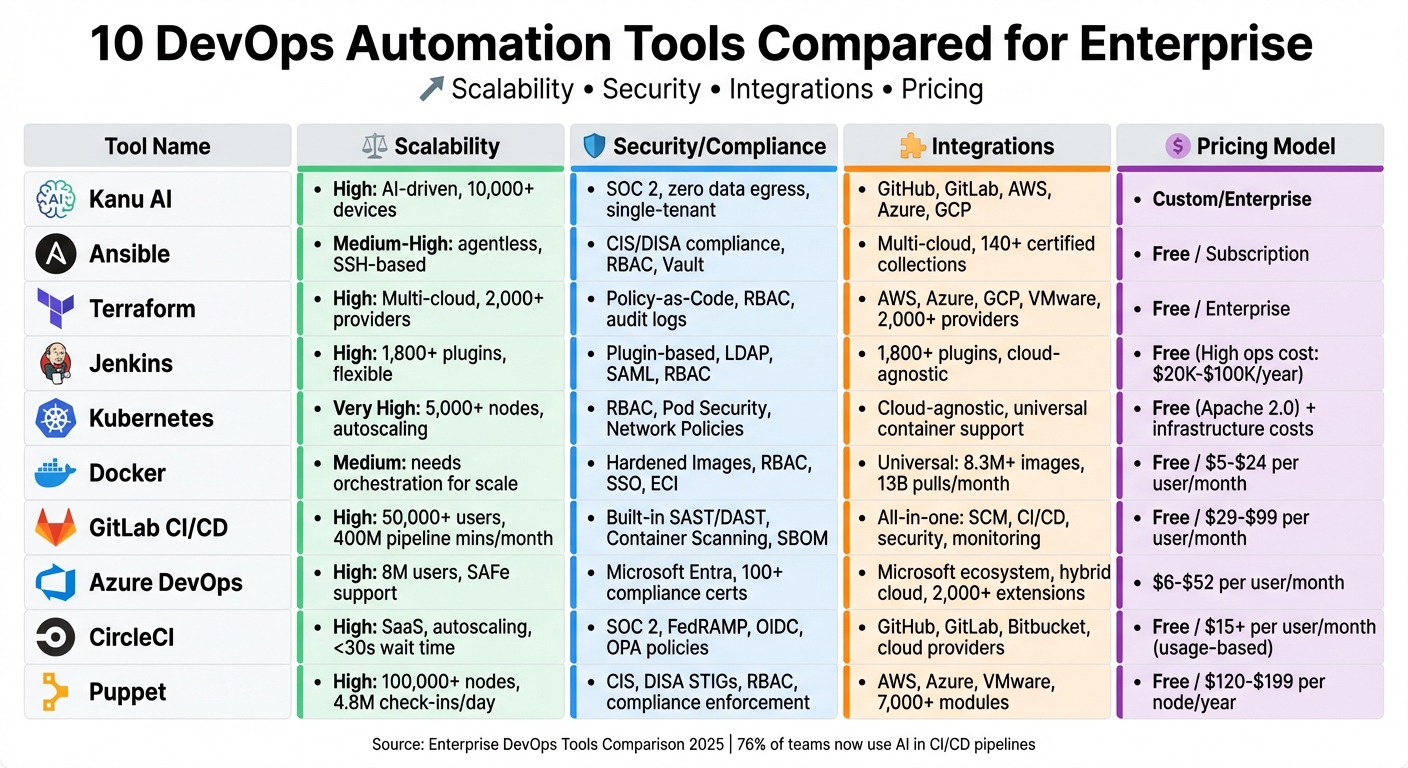
10 DevOps Automation Tools Comparison: Features, Pricing & Enterprise Scalability
10 Best DevOps Tools in 2025: Top Picks You Should Know
sbb-itb-3b7b063
1. Kanu AI
Kanu AI streamlines the entire software lifecycle - from building to deployment and validation - right within your existing cloud setup. It uses three specialized agents - Intent Agent, DevOps Agent, and Q/A Agent - to handle requirements, generate code, and ensure deployment readiness with 250+ automated validation checks on live systems.
Scalability
Designed for large-scale operations, Kanu AI generates both application and infrastructure code in formats like Terraform, CDK, and CloudFormation. It supports concurrent deployments across teams, analyzing logs and metrics in real time to identify and fix issues automatically. By taking care of errors until deployment is complete, it significantly reduces the need for manual intervention, especially in complex, large-scale environments.
Security & Compliance
Kanu AI prioritizes security with its single-tenant architecture, operating exclusively within designated cloud environments. It adheres to SOC 2 Type II standards and enforces a zero data egress policy, ensuring sensitive data stays within your cloud. Additionally, every action is logged with full audit trails and rollback support, giving you control and transparency over all processes.
Integration Capabilities
Kanu AI integrates effortlessly with tools like GitHub and GitLab, automatically creating configuration pull requests. It works directly within your existing AWS, Azure, or Google Cloud accounts, eliminating the need for data migration. This compatibility ensures teams can adopt Kanu AI without disrupting their current workflows or requiring extensive retraining, making it a seamless addition to enterprise DevOps pipelines.
Pricing
Pricing is customized based on enterprise-specific needs and is determined through consultation, reflecting the platform's tailored approach for large-scale deployments.
2. Ansible
Ansible simplifies infrastructure management by using agentless connections like SSH for Linux and WinRM for Windows, eliminating the need to install software agents on every endpoint. Tasks are defined through YAML-based playbooks, making it approachable for teams without advanced programming skills.
Enterprise Scalability
Ansible is built to scale effortlessly across various environments. With Ansible Automation Platform 2, the control and execution planes are separated, ensuring that intensive job execution doesn’t slow down the system. The platform also introduces Automation Mesh, a bi-directional network designed to extend automation across on-premises data centers, cloud setups, and edge locations.
Features like job slicing distribute tasks across multiple controllers to prevent overloading nodes, while adjustable parallel tasks allow organizations to tailor automation to their hardware capabilities. Additionally, Execution Environments package dependencies into containerized images, ensuring automation consistency across different deployment locations.
Organizations using Ansible Automation Platform report impressive results: achieving automation capabilities 83% faster compared to DIY approaches, managing 30% more automation with 44% fewer resources, and realizing a 749% ROI over three years, which translated to $22.4 million in savings.
Security & Compliance
Ansible addresses enterprise security with features like Role-Based Access Control (RBAC), which ensures only authorized users can execute tasks. Sensitive data, such as passwords and keys, can be encrypted within playbooks using Ansible Vault. For compliance, the platform offers audit logging and an automation dashboard that tracks historical changes.
The Red Hat Ansible Automation Platform enhances security further by providing a trusted chain-of-custody for certified content. It includes over 140 certified content collections from more than 60 partners, featuring integrations with tools like CyberArk, HashiCorp Vault, Palo Alto Networks, and Splunk. Enterprise users also benefit from extended support, including security vulnerability backporting and critical bug fixes for at least 18 months per release. The platform’s Policy as Code feature allows compliance requirements to be codified and security patches to be automated.
Integration Capabilities
Ansible seamlessly integrates with platforms like AWS, Azure, Google Cloud, Docker, Kubernetes, and Helm, as well as ITSM tools such as ServiceNow. It even includes a certified collection for HashiCorp Terraform, enabling users to manage Infrastructure as Code within Ansible workflows.
Its agentless design makes it compatible with legacy systems, using standard protocols to bridge gaps. Ansible’s extensive module library supports a wide range of tools, from network devices and security tools to bare metal servers and virtualized environments. Many enterprises combine Terraform for provisioning cloud infrastructure with Ansible for ongoing configuration and maintenance.
Pricing
The open-source version of Ansible is free but lacks enterprise-level features like SLA guarantees, security hardening, and centralized RBAC. For these capabilities, Red Hat Ansible Automation Platform is available through a subscription model. Pricing typically depends on the number of managed nodes and the level of support required. Both managed and self-managed versions are offered on AWS, Azure, and Google Cloud, which can often count toward committed cloud spend agreements.
3. Terraform
Terraform relies on Infrastructure as Code (IaC) principles to provision and manage cloud resources using its declarative language, HashiCorp Configuration Language (HCL). This approach allows teams to define their entire infrastructure as code, making version control, peer reviews, and automation seamless.
Enterprise Scalability
Terraform is compatible with a broad range of cloud providers, including AWS, Azure, Google Cloud, and VMware, enabling organizations to manage multi-cloud environments through a single, declarative workflow. Enterprises often use reusable modules to maintain consistent deployments across teams and minimize repetitive code. To prevent conflicting changes, Terraform employs remote state management with state locking, utilizing backends like AWS S3 paired with DynamoDB.
For centralized governance, Terraform Enterprise and HCP Terraform (formerly Terraform Cloud) offer features like a private module registry, which helps organizations control code promotion and versioning at scale. Policy as Code, powered by tools like Sentinel and Open Policy Agent, ensures compliance and enforces standards before resources are provisioned. In February 2025, HashiCorp became part of IBM's hybrid cloud portfolio. HCP Terraform also offers a free tier for up to 5 users, while versions released after 1.5 operate under the Business Source License (BUSL). These features create a solid foundation for implementing advanced security and compliance measures.
Security & Compliance
Terraform's framework is designed with security and compliance in mind. Policy as Code runs between the terraform plan and terraform apply stages, allowing organizations to enforce rules such as requiring cost-center tags, restricting certain cloud regions, or blocking the creation of public-facing databases. Security features include role-based access control (RBAC), team-specific permissions, SAML SSO, and detailed audit logging for every infrastructure change. Automated drift detection ensures that live infrastructure remains aligned with defined configurations, maintaining continuous compliance.
Terraform also integrates with security tools like Checkov, Trivy, and KICS to identify misconfigurations - such as IAM wildcards, unencrypted EBS volumes, or open security groups - before deployment. Scanning the JSON output of a terraform plan is a recommended practice for enhancing security.
For organizations requiring more control, Terraform Enterprise can be deployed on-premises or within private clouds, providing flexibility over networking, data residency, and other internal security needs.
Integration Capabilities
Terraform works seamlessly with version control systems and CI/CD pipelines, enhancing automation workflows. It integrates with platforms like GitHub, GitLab, and Bitbucket to trigger processes automatically when code is committed. As part of CI/CD pipelines, Terraform interacts with tools like Jenkins, GitHub Actions, Azure DevOps, and GitLab CI/CD, making infrastructure provisioning an integral part of the application delivery process.
Pricing
| Tier | Pricing Model | Key Features |
|---|---|---|
| Terraform CLI | Free (BUSL) | Local or manual execution with open-source functionality |
| HCP Terraform Free | Free for up to 5 users | Includes remote state management and version control system integration |
| HCP Terraform Paid | Team & Governance tiers | Offers advanced security, Policy as Code, and private registry capabilities |
| Terraform Enterprise | Self-hosted/Custom pricing | Includes SAML SSO, advanced audit logging, and a self-managed environment |
4. Jenkins
Jenkins has been a cornerstone of CI/CD pipelines since its debut in 2011. As an open-source automation server with over 1 million users and more than 20,000 stars on GitHub, it remains a go-to tool for enterprise automation. Its architecture is built on a controller-agent model, where a central controller orchestrates workflows and delegates tasks like building and testing to multiple agents.
Enterprise Scalability
Jenkins supports both vertical and horizontal scaling through dynamic agents and parallel execution. For instance, its Kubernetes plugin can automatically provision agents on demand, scaling infrastructure as needed. The ability to run parallel tasks across different nodes significantly reduces build times. However, Jenkins lacks built-in federation, meaning enterprises often rely on multiple instances to handle large-scale operations. While the software itself is free under the MIT license, the total cost of ownership can add up due to administrative overhead, often requiring several full-time engineers. To streamline processes and reduce redundancy, many organizations implement shared pipeline libraries, ensuring consistency across projects. Jenkins also secures these scalable environments with robust access controls.
Security & Compliance
Jenkins offers a range of security features designed for enterprise environments. It integrates with identity providers like LDAP and SAML 2.0, including popular options such as Okta, Azure AD, and OneLogin. Administrators can implement fine-grained Role-Based Access Control (RBAC) to assign specific permissions to users or groups. Sensitive data like passwords, API tokens, and SSH keys are securely stored using the Credentials Plugin, which also ensures automatic masking in build logs. A security researcher once noted:
"Running Jenkins without proper security is like leaving your front door wide open." – nawazdhandala, Security Researcher
To enhance safety, Jenkins supports pipeline sandboxing, which restricts Groovy scripts unless explicitly approved by an administrator. Additional features like Agent-to-Controller Access Control prevent build agents from accessing the controller's file system, while the Audit Trail plugin provides a detailed record of build activities and user actions. This level of transparency is essential for meeting compliance requirements. Organizations are encouraged to complete the initial setup wizard to enable all available security measures.
Integration Capabilities
Jenkins boasts an ecosystem of over 1,800 plugins, allowing seamless integration with nearly every tool in the DevOps lifecycle. It works natively with version control systems like GitHub, GitLab, Bitbucket, and Subversion, and supports major cloud providers such as AWS, Azure, and GCP. Additionally, it integrates with container technologies like Docker and Kubernetes. Jenkins is language-agnostic, supporting builds for Java, Python, Go, Node.js, .NET, and mobile platforms. For infrastructure automation, it pairs well with tools like Terraform and Ansible. Using Docker containers for build environments is a common best practice to avoid dependency conflicts. However, regular audits of community-maintained plugins are crucial, as some may become unstable over time. These extensive integration options are a key factor in Jenkins' enduring popularity.
Pricing
While Jenkins is free under the MIT license, enterprises should consider the associated costs of infrastructure, maintenance, and integration.
| Tier | Cost | Key Considerations |
|---|---|---|
| Jenkins Open Source | Free (MIT license) | Additional expenses include infrastructure and maintenance. |
| Infrastructure Costs | Variable | Covers hosting, compute resources, and storage. |
| Maintenance Labor | 0.25–5 FTEs annually | Simple setups may need around 0.25 FTE, while complex systems can require 2–5 FTEs. |
| CloudBees CI | Custom/Subscription | Offers an enterprise-grade version with centralized management. |
As an industry expert pointed out:
"Jenkins is one of the most maintenance-intensive CI tools on the market, which is expected from a ten year old product." – Harness
While Jenkins offers unmatched flexibility and control, especially for on-premise or air-gapped environments, it demands a significant engineering effort for plugin management, infrastructure upkeep, and scripting compared to newer SaaS alternatives.
5. Kubernetes
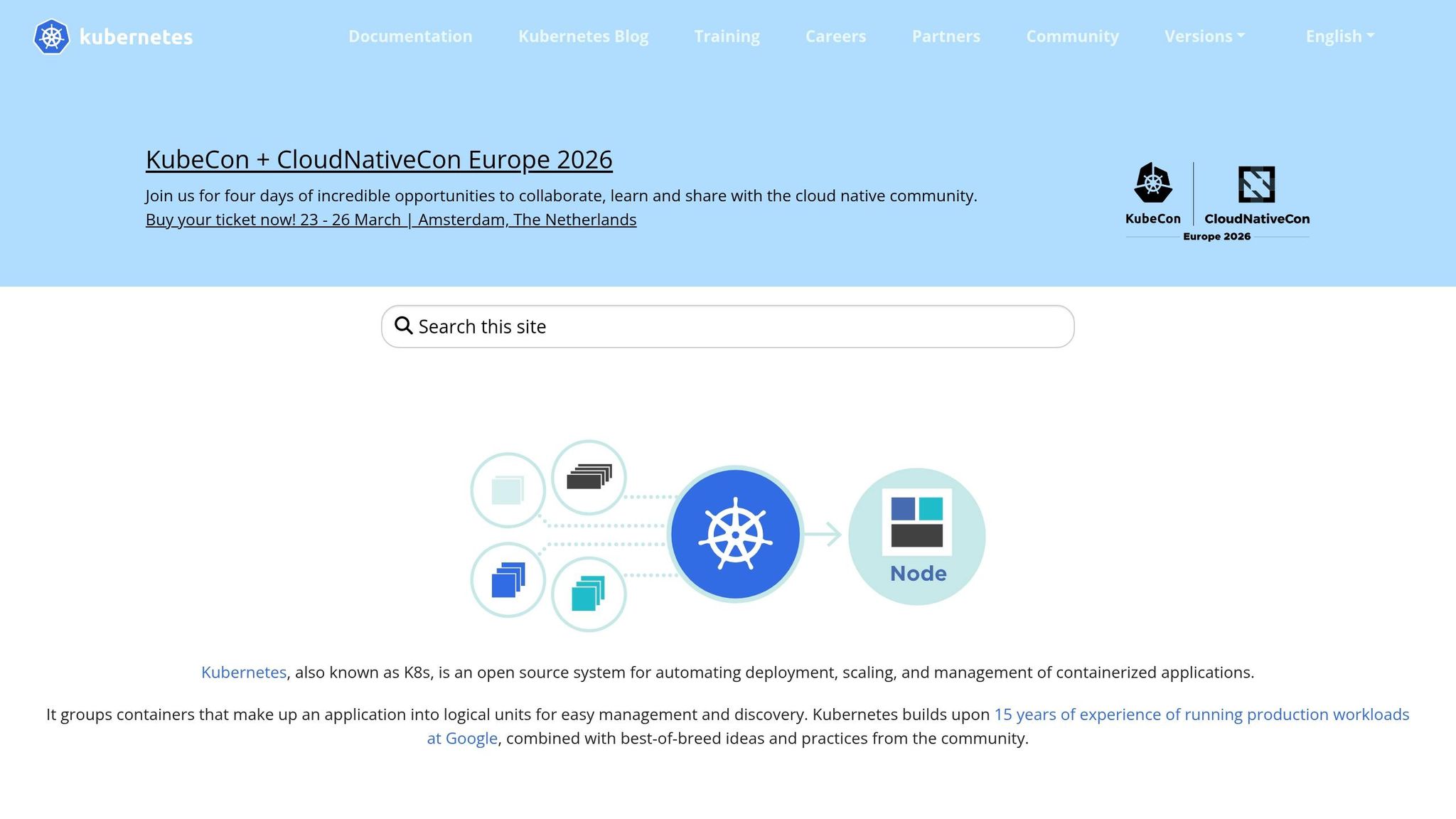
Kubernetes has grown far beyond its original purpose as a container orchestration tool. Released by Google in 2014 and now managed by the Cloud Native Computing Foundation, it’s offered under the Apache-2.0 license at no cost. Kubernetes is designed to manage containerized applications across clusters, handling deployment, scaling, and recovery automatically. These capabilities make it a go-to solution for large-scale, dynamic enterprise environments.
Enterprise Scalability
Kubernetes continuously monitors your cluster and adjusts resources to match the desired configuration. Its self-healing capabilities replace failed pods or nodes automatically. For scaling, Kubernetes supports horizontal, vertical, and cluster autoscaling, ensuring resources align with demand. This reduces manual intervention, which is key for improving efficiency and reliability in enterprise settings.
When managing multiple clusters across different cloud providers, tools like Rancher and OpenShift centralize role-based access control, security policies, and lifecycle management. GitOps controllers such as ArgoCD and Flux ensure configuration consistency by using Git repositories as the source of truth, automating synchronization across clusters and preventing configuration drift. Machine learning can also play a role, optimizing resource use to cut cloud costs and improve productivity.
Enterprises often waste 5–9% of cloud spending due to underutilized nodes caused by conservative autoscaling and inefficient resource allocation. Machine learning-driven tools can reduce these costs by over 30% while boosting application performance by up to 75%. However, to avoid instability, it’s essential to coordinate pod-level and node-level automation effectively. For many teams, starting with managed Kubernetes services like EKS, GKE, or AKS can reduce operational overhead unless full control over the control plane is a necessity.
Security & Compliance
Kubernetes includes built-in security features like Role-Based Access Control (RBAC) for managing user permissions, Network Policies to restrict pod-to-pod communication, Secrets for storing sensitive data, and Pod Security Standards to enforce best practices. Enterprise security spans four key layers: Cloud, Cluster, Container, and Code.
Security tools like Trivy, Kubescape, Falco, OPA/Gatekeeper, and Kyverno offer vulnerability scanning, admission control, and runtime threat detection. For example, over 25,000 organizations, including Intel and AWS, use Kubescape to ensure compliance with frameworks like CIS Benchmarks, NSA/CISA hardening guidance, MITRE ATT&CK, SOC 2, PCI DSS, and HIPAA. Regularly analyzing RBAC roles and service account privileges is essential to maintain a least-privilege model, ensuring users and pods only have the access they need.
Integration Capabilities
Kubernetes doesn’t just scale and secure - it also integrates seamlessly with CI/CD and infrastructure tools. Jenkins, for example, uses a Kubernetes plugin to create build agents as pods dynamically. GitLab CI/CD offers direct integration for deploying to Kubernetes clusters, while CircleCI uses "orbs" (reusable configurations) to automate Kubernetes workflows. Ansible provides over 500 modules for tasks like networking, security, and deployment.
GitOps tools like ArgoCD and Flux ensure consistency through a pull-based delivery model, where the cluster syncs its state with a Git repository. As Mridul from DevOps Training Institute puts it:
"Kubernetes has matured into the 'operating system of the cloud,' the focus has shifted from simple orchestration to sophisticated, end-to-end automation."
For infrastructure provisioning, Kubernetes integrates with Terraform and Pulumi, while Crossplane extends this functionality to manage external cloud resources like databases using Kubernetes YAML manifests. Helm simplifies application deployment by bundling configurations into versioned charts, while Kustomize offers flexible customization without templates. Prometheus and Grafana handle metrics and monitoring, while Datadog and New Relic provide advanced tracing and log correlation for containerized environments.
Platforms like Qovery and KubeSphere sit on top of Kubernetes to simplify its complexity, offering a Heroku-like experience for developers. Mélanie Dallé, Senior Marketing Manager at Qovery, highlights this:
"Choosing the right DevOps toolchain comes down to how much raw Kubernetes YAML your team actually wants to write."
Pricing
Kubernetes itself is free under the Apache-2.0 license, but enterprises need to account for infrastructure and operational expenses. Here’s a breakdown of typical costs:
| Tier | Cost | Key Considerations |
|---|---|---|
| Open Source | Free (Apache-2.0) | Requires teams to manage infrastructure and maintenance. |
| Managed Services | Variable + hourly fee | AWS EKS, Google GKE, and Azure AKS charge for compute resources and control plane management. |
| GitLab Premium | ~$19/user/month | Includes Kubernetes CI/CD integration. |
| Harness | ~$25/user/month | Starts at around $15,000/year for teams. |
| Red Hat OpenShift | High cost/Custom | Resource-intensive, requires expertise, and locks teams into the Red Hat ecosystem. |
Observability tools like Datadog can become expensive at scale due to custom metrics and log ingestion costs. Deciding between managed and self-managed clusters depends on whether your team values reduced operational effort or prefers full control over the control plane.
6. Docker
Docker continues to play a crucial role in containerized application development, standing as the backbone for standardizing and building containers. It originally set the stage for modern containerization and remains the go-to solution for creating and running containers. Released as open-source under the Apache 2.0 license, Docker effectively eliminates the "works on my machine" issue by standardizing environments across development, staging, and production. By 2026, the Docker container market has grown to $6.12 billion, with about 92% of IT professionals incorporating containers into their workflows.
Enterprise Scalability
Docker's "build once, run anywhere" philosophy ensures consistent environments across the board. While Docker Swarm handles up to 1,000 nodes efficiently, enterprises often pair Docker with Kubernetes to manage larger clusters exceeding 5,000 nodes. In this setup, Docker focuses on building and packaging containers, while Kubernetes takes care of orchestration.
The Docker Build Cloud speeds up CI/CD pipelines by shifting resource-heavy builds to robust cloud infrastructure. Additionally, the adoption of the containerd image store in Docker Engine 29 has improved performance and compatibility with modern orchestration tools. Mirantis has pledged support for Docker Swarm through at least 2030, ensuring its continued relevance.
Security & Compliance
In May 2025, Docker introduced Hardened Images, designed to minimize known vulnerabilities for enterprises prioritizing security. Tools like Docker Scout provide real-time supply chain security analysis, helping teams identify and address vulnerabilities before deployment. For larger organizations, Docker Business offers Enhanced Container Isolation (ECI) to prevent container-breakout attacks, alongside features like Single Sign-On (SSO), Role-Based Access Control (RBAC), and SCIM for automated user provisioning.
Administrators can also restrict developers to company-approved registries and images through Registry Access Management and Image Access Management. Docker Engine 29 added an Identity field for verifying image provenance, enhancing software supply chain integrity. For high-security environments, running Docker in rootless mode mitigates risks tied to the daemon operating with root privileges.
Integration Capabilities
Docker integrates smoothly with major cloud platforms like AWS (Fargate, ECS), Google Cloud (Run), and Azure (Container Instances). It’s also a vital part of CI/CD workflows, supported by tools such as GitHub Actions, GitLab CI/CD, Jenkins, CircleCI, and Buildkite. Docker Hub, hosting over 8.3 million image repositories, handles a staggering 13 billion monthly pulls.
Even though Kubernetes deprecated the "dockershim" runtime, Docker stays relevant by producing OCI-compliant images that can run on any CRI-compatible runtime. As the engineering team at Tasrie IT puts it:
"Docker and Kubernetes are not competitors. They are complementary tools that serve different purposes in the container lifecycle. Docker builds and runs containers. Kubernetes orchestrates and manages them at scale."
Additionally, Docker integrates with popular IDEs like Visual Studio 2026, VS Code, and JetBrains, offering direct debugging and container management. For integration testing, Testcontainers Cloud enhances developer workflows.
Pricing
Docker offers flexible pricing options tailored to both small teams and large enterprises:
| Tier | Cost | Key Details |
|---|---|---|
| Docker Personal | Free | For companies with fewer than 250 employees and under $10 million in annual revenue. |
| Docker Pro | $9/month per user | Ideal for individual developers needing advanced features. |
| Docker Team | $15/month per user | Designed for small teams requiring collaboration tools. |
| Docker Business | $24/month per user | Geared toward large enterprises, includes SSO, SCIM, ECI, and 24-hour SLA support. |
The Docker Engine and CLI remain open-source and free under the Apache 2.0 license. However, companies with over 250 employees are required to use paid subscriptions to comply with Docker's licensing terms.
7. GitLab CI/CD
GitLab CI/CD combines source control, pipelines, security scanning, and monitoring into a single platform, removing the hassle of juggling multiple tools. This integrated system handles over 400 million pipeline minutes monthly for a community of more than 30 million developers. By simplifying toolchains, it meets the needs of enterprises looking for efficient, scalable, and secure DevOps pipelines.
Enterprise Scalability
GitLab's architecture is built to scale, supporting installations with 50,000+ users while ensuring zero downtime during upgrades. It’s designed for fast-paced development with features like Merge Trains, which automate merges without disrupting the main branch. For more intricate workflows, DAG pipelines allow jobs to start as soon as their dependencies are complete.
The platform’s impact is clear in real-world use cases. Lockheed Martin saw CI builds speed up by 80 times and cut maintenance time by 90%, while Radio France achieved 5x faster deployments and saved 70% on annual costs. GitLab Runners can autoscale with cloud providers like AWS EC2, reducing costs by up to 90% during fluctuating workloads. For global teams, GitLab Geo offers local read-only instances to reduce latency and doubles as a disaster recovery solution.
In addition to scalability, GitLab CI/CD prioritizes security and compliance to safeguard enterprise workflows.
Security & Compliance
GitLab ensures supply chain security with support for SHA digests for Docker images and integration with secrets managers like HashiCorp Vault, Azure Key Vault, and Google Cloud Secret Manager. Its Ultimate tier includes features like Container Scanning, Dependency Scanning, and Software Bill of Materials (SBOM) to catch vulnerabilities early. Merge Request Guardrails enforce approval and authentication before code is deployed.
For secure environments, it’s recommended to avoid using "latest" tags for Docker images. Instead, pin specific SHA256 digests to prevent malicious image injection. Deployment access is restricted to authorized users through protected environments, ensuring only vetted code reaches production - especially crucial for regulated industries. Additionally, GitLab automatically tracks actions from planning to deployment, providing the audit trails necessary for compliance.
GitLab’s robust security framework is complemented by its ability to integrate with a wide range of enterprise tools.
Integration Capabilities
GitLab works seamlessly with AWS, Google Cloud Platform, and Microsoft Azure, and integrates with Kubernetes, Helm, and Amazon ECS. It supports GitOps workflows via Flux CD and connects with tools like Jira for issue tracking, ServiceNow for change management, and Prometheus for monitoring. The CI/CD Catalog helps teams standardize workflows by enabling the reuse of pipeline components without needing to write custom scripts for every project.
For custom setups, GitLab offers REST and GraphQL APIs. Parent-child pipelines break down workflows into smaller, more manageable parts, improving performance and clarity. By automating tasks like fixing failed builds and linting errors, AI agents such as Gitar can save organizations thousands of hours annually.
Pricing
GitLab CI/CD offers flexible pricing options to suit various needs, from small teams to large enterprises.
| Tier | Cost | Compute Minutes | Key Features |
|---|---|---|---|
| Free | $0/user/month | 400 | Basic CI/CD, 10 GiB storage |
| Premium | $29/user/month | 10,000 | Merge trains, protected environments, disaster recovery |
| Ultimate | $99/user/month | 50,000 | Container scanning, vulnerability management, compliance dashboards, SBOM |
Managing a GitLab instance typically requires about 2 Full-Time Equivalents (FTEs). A single GitLab CI/CD server can support over 25,000 users, making it an ideal choice for large-scale deployments.
8. Azure DevOps
Azure DevOps stands out in the DevOps automation landscape by offering scalability, robust security, and smooth integration across hybrid environments. It brings together five essential services for enterprise-level project management: Boards, Repos, Pipelines, Test Plans, and Artifacts. With around 8 million users projected by 2026, Azure DevOps is designed for organizations needing advanced governance, legacy system support, and comprehensive release management. This makes it particularly suited for enterprises dealing with complex scalability and compliance requirements. Unlike lightweight tools, Azure DevOps thrives in environments where structured work tracking, manual approvals, and strict regulatory standards are critical.
Enterprise Scalability
Azure Boards supports SAFe frameworks with hierarchical backlogs, aligning business objectives with engineering tasks. Azure Pipelines handle multi-stage deployments, complete with manual approval gates and environment-specific rules, making them ideal for large Kubernetes clusters and multi-subscription setups. The platform’s modular design allows businesses to adopt services gradually, and it continues to support Team Foundation Version Control (TFVC) and on-premises agents, ensuring compatibility with older systems and legacy codebases.
"Azure DevOps isn't just a great tool, it has fueled the change culturally in what was a classic telco to now becoming a really great software business." – Ben Connolly, Global Head of Cloud Engineering, Vodafone
High-performing teams leveraging platforms like Azure DevOps recover from failures 24 times faster. A 2025 update introduced the Unified Pipeline Concept, enabling hybrid workflows and incremental migrations without disrupting ongoing processes.
Security & Compliance
Azure DevOps integrates seamlessly with Microsoft Entra ID (formerly Azure AD), offering role-based access control, single sign-on, and multi-factor authentication [95, 97]. Its security model is built on zero-trust principles and includes Conditional Access Policies for secure access. Temporary administrative privileges are granted via Microsoft Entra Privileged Identity Management, reducing risks associated with permanent access [95, 97].
For secret-free authentication, Azure DevOps supports Workload Identity Federation through OpenID Connect, allowing pipelines to securely access Azure resources without storing sensitive credentials [95, 97]. It also boasts over 100 compliance certifications, including ISO/IEC 27001, SOC 1/2/3, GDPR, FedRAMP, and HIPAA, catering to industries like finance, healthcare, and government [96, 97]. Additionally, Microsoft has a dedicated security team of over 34,000 engineers.
Integration Capabilities
Azure DevOps offers extensive integration options, deploying to Azure, AWS, Google Cloud, and on-premises servers. Through Azure Arc, it centralizes hybrid resource management [101, 92]. Its compatibility with the Microsoft ecosystem enhances functionality, integrating with Entra ID for identity management, Teams for notifications, and Visual Studio/VS Code for development tasks [99, 101]. Azure Key Vault integration ensures secrets can be securely shared across both Azure DevOps and GitHub Actions without duplication.
The Azure DevOps extension marketplace includes over 2,000 enterprise-focused extensions [91, 93]. Native GitHub integration links Azure Boards work items to GitHub commits and pull requests, enabling teams to use GitHub for source control while maintaining Azure Boards for Agile planning [93, 99]. YAML pipeline templates further enhance security and compliance enforcement across projects.
These features make Azure DevOps a cost-effective solution for enterprise deployments, as outlined in its pricing structure.
Pricing
Azure DevOps offers flexible, scalable pricing tailored to various organizational needs, from small teams to large enterprises requiring advanced testing and security.
| Tier | Cost | Key Features |
|---|---|---|
| Basic Plan | Free for first 5 users, then $6/user/month | Unlimited private Git repos and 1,800 free build minutes per month |
| Basic + Test Plans | $52/user/month | Includes manual and exploratory testing features |
| Azure Pipelines | $40/month per hosted parallel job; $15/month per self-hosted job | Pricing beyond the free tier allocation |
| Azure Artifacts | First 2GB free, then ~$2/GB/month | Supports multiple package formats (e.g., NuGet, npm, Maven, Python) |
| Azure Advanced Security | $49 per active committer/month | Covers secret scanning, dependency scanning, and CodeQL analysis |
Organizations using Azure DevOps Managed Services have seen a 50% reduction in deployment cycle times and 20–40% savings on cloud expenses. This pricing model highlights Azure DevOps' ability to lower deployment times and operational costs effectively.
9. CircleCI
CircleCI stands out for its fast and reliable pipeline execution, thanks to its autoscaling infrastructure that eliminates execution delays. The platform handles thousands of concurrent jobs without queuing issues, keeping wait times consistently under 30 seconds - even when initiating up to 500 jobs simultaneously. For larger enterprises, this efficiency can translate into massive time savings. For instance, a company with 1,000 developers running three pipelines daily could save approximately 5,475,000 developer minutes annually by cutting pipeline durations.
Enterprise Scalability
CircleCI supports a wide variety of resource classes, including Docker, Linux, Windows, macOS, Arm, and GPU-accelerated machines, enabling teams to allocate the right compute power for each job. Its "Smarter Testing" feature focuses on running only the tests affected by changes, which can slash pipeline durations by up to 97%. Additionally, platform teams can enforce organization-wide policies and manage templates across repositories for centralized governance.
"CircleCI gives us the ability to scale without having to think about capacity or provisioning and we never worry about running out of resources." – James Bourne, Software Engineer, Contentful
Compared to GitHub Actions' default runners, CircleCI pipelines are approximately 40% faster at the median and experience 99.12% less queuing during high-volume operations. The platform offers both cloud-hosted and self-hosted runners with dynamic autoscaling, including Kubernetes clusters for enterprises with strict data residency requirements. This combination of speed and scalability is paired with robust security features.
Security & Compliance
CircleCI meets stringent regulatory standards, including SOC 2 Type II and FedRAMP compliance, making it suitable for enterprise and government use. It offers fine-grained Role-Based Access Control (RBAC), Single Sign-On (SSO) integration, and OpenID Connect (OIDC) for secure, secretless authentication with cloud providers. Security policies can be enforced through Open Policy Agent (OPA), ensuring compliance across all pipelines.
"With CircleCI, by incorporating security verification tools during testing, we are able to perform verification from an earlier stage and more frequently; this reduces major rework." – Toshiaki Maeda, Team Lead, ANA Systems
Builds run in isolated, ephemeral environments with network isolation, automated vulnerability scans, and detailed audit logs to track deployment activities. The platform also includes built-in secrets management and OIDC for secure, credential-free authentication.
Integration Capabilities
CircleCI enhances workflows with seamless integrations. It connects natively with GitHub, GitLab, and Bitbucket, offering platform independence and avoiding vendor lock-in. Developers can leverage reusable YAML packages (Orbs), RESTful APIs, webhooks, CLI tools, and a VS Code extension to integrate with third-party tools like AWS, GCP, Azure, and Slack - all while minimizing context switching.
"CircleCI was super-easy to set up; the maturity and the robustness of the tool was perfect and fits well with our needs." – Xavier Portilla Edo, Infrastructure Team Lead, Voiceflow
For troubleshooting, CircleCI provides native SSH debugging, allowing developers to log into running containers to resolve complex pipeline issues. It also supports automated deployment workflows with major cloud providers and Kubernetes, along with Enterprise SSO (SAML) for identity management. These features make CircleCI a versatile tool for modern enterprise CI/CD pipelines.
Pricing
| Tier | Cost | Key Features |
|---|---|---|
| Free | $0/month | 6,000 build minutes, up to 30 concurrent jobs, Docker/Linux/Windows/macOS/Arm support |
| Performance | Starts at $15/month | 5 user seats, 80 concurrent jobs, 30,000 monthly credits (roll over up to 12 months) |
| Scale | Starts at $2,000/month (annual) | Custom credits, unlimited builds, priority support, and audit logging |
| Server | Custom pricing | Self-hosted on-premises or private cloud, 30 seats, unlimited build minutes, 24/7 support |
CircleCI's usage-based pricing ensures that businesses only pay for the compute time and resources they actually use. The free tier is a great starting point for teams to evaluate performance before committing to a paid plan.
10. Puppet
Puppet simplifies configuration management for organizations handling thousands of nodes across hybrid infrastructures. Trusted by 80% of the Global 5000 companies, Puppet manages everything from Linux and Windows servers to network devices and edge systems - all through a single control plane. Its agent-based pull model distributes workloads efficiently, enabling each compiler to manage 3–5 times more nodes compared to traditional push-based systems.
Enterprise Scalability
Puppet’s architecture is designed to scale seamlessly, accommodating everything from small setups to large enterprise environments. A single server can handle up to 2,500 nodes, and scaling beyond that is straightforward: add compilers, load balancers, or deploy a high-availability database cluster for environments exceeding 20,000 nodes. Puppet Enterprise has proven its capability to manage over 100,000 nodes, processing approximately 4.8 million check-ins daily. Agents enforce desired configurations every 30 minutes, automatically correcting any drift. To minimize risks, the Impact Analysis feature previews code changes before implementation.
"We saw value in upgrading to Puppet Enterprise Advanced to take advantage of Security Compliance Enforcement and Impact Analysis." – Sr. Staff IT Security Engineer, Telecommunications Tech Manufacturer
Swiss Re’s System Engineer John Rogers successfully transitioned the company’s 5,800 Unix and Windows servers from manual tools like SCCM and GPOs to Puppet. Similarly, Darren Gipson, Lead DevOps Engineer at WTW, leveraged Puppet to manage a fully Azure-hosted Windows infrastructure, achieving both cost savings and operational improvements.
Security & Compliance
Beyond scalability, Puppet excels at maintaining strict security and compliance standards. Its Security Compliance Enforcement feature ensures alignment with CIS Benchmarks and DISA STIGs, with agents remediating configuration drift every 30 minutes - even during network disruptions. Puppet integrates with vulnerability scanners like Nessus to identify security issues and automate patching across Windows and Linux systems. Impressively, 97% of users report improved security and compliance postures after adopting Puppet. Its "Policy as Code" approach standardizes security configurations across hybrid environments, while Role-Based Access Control (RBAC) works with OpenLDAP and Active Directory to prevent unauthorized changes.
Integration Capabilities
Puppet integrates seamlessly with popular observability tools like Splunk, Grafana, Prometheus, Datadog, and New Relic via its Observability Data Connector, enabling real-time data sharing. Its ServiceNow integration (available in Enterprise Advanced) streamlines self-service provisioning and automated ticket updates, potentially saving up to 200 hours per month. The Playbook Runner allows Puppet to execute Ansible playbooks and ad hoc commands, easing the transition for teams with existing automation workflows. Additional integrations include Jenkins plugins for CI/CD pipelines and Docker support for building containers using Puppet code. Puppet Forge further expands its capabilities with over 7,000 prebuilt modules for common automation tasks.
Pricing
| Tier | Cost | Key Features |
|---|---|---|
| Open Source | Free | Community edition under Apache 2.0 license |
| Puppet Enterprise | Free for 10 nodes; ~$120/node/year | Standard configuration, RBAC, basic patching |
| Puppet Enterprise Premium | ~$199/node/year | Advanced features like Security Compliance Enforcement and Impact Analysis |
Puppet Enterprise is free for up to 10 nodes, offering teams the chance to explore its features before scaling. Beyond that, pricing starts at approximately $100 per node, with costs varying based on deployment size and specific needs.
Strengths and Weaknesses
Here’s a closer look at the strengths and weaknesses of these tools, providing a snapshot of what enterprises should consider when adopting them. This section condenses the detailed analyses into key takeaways for each tool.
Kanu AI speeds up AI test orchestration by 70% compared to traditional cloud grids, supports over 10,000 devices, and cuts downtime by 82%. Ansible uses an agentless YAML-based approach, is highly rated for CIS/DISA STIG compliance (4.7/5 on G2), but may encounter challenges at very large scales. Terraform, a go-to for multi-cloud Infrastructure as Code, supports over 2,000 providers and holds a 4.6/5 rating, though managing state files can become tricky as deployments grow.
Jenkins offers unmatched flexibility with 1,800+ plugins but comes with high operational costs, requiring 0.5 to 2.0 FTE and annual investments ranging from $20,000 to $100,000. Kubernetes is the leading container orchestration platform with self-healing capabilities and a 4.8/5 G2 rating, but its steep learning curve can be a hurdle. Docker ensures consistent environments and has a 4.7/5 rating, though it often requires external orchestration tools like Kubernetes for scaling in enterprise environments.
GitLab CI/CD combines version control, CI/CD, and built-in SAST/DAST security scanning in one platform, scaling to over 50,000 users with a 4.6/5 rating. However, its resource demands and costs can increase significantly for larger teams. Azure DevOps is ideal for Microsoft-focused enterprises, offering granular RBAC and audit logs at $6 per user per month, but it is less versatile outside the Microsoft ecosystem. CircleCI provides fast and managed CI/CD with an easy setup and a 4.4/5 rating, though its usage-based pricing can quickly escalate under heavy workloads.
Puppet is tailored for configuration management in large-scale enterprise settings, offering robust security reporting but requiring teams to learn its proprietary DSL.
Summary Table:
| Tool | Enterprise Scalability | Security/Compliance | Integration Capabilities | Pricing Model |
|---|---|---|---|---|
| Kanu AI | High (10,000+ devices) | AI-driven insights; 82% downtime reduction | Jenkins, GitLab, CircleCI | Managed/SaaS |
| Ansible | Medium-High | CIS/DISA compliance | Multi-cloud, SSH-based | Free / Enterprise |
| Terraform | High (Multi-cloud) | Policy-as-Code | 2,000+ providers | Free / Enterprise |
| Jenkins | High (complex setups) | Plugin-dependent | 1,800+ plugins | Free (with high ops costs) |
| Kubernetes | Very High | Native RBAC/Secrets | Cloud-agnostic | Free (Open Source) |
| Docker | Medium (orchestration needed) | Image signing/SSO | Universal | Free / $5 per user/month |
| GitLab CI/CD | High (50,000+ users) | Built-in SAST/DAST | All-in-one platform | Free / $29 per user/month |
| Azure DevOps | High | Microsoft Entra/IAM | Microsoft ecosystem | $6 per user/month |
| CircleCI | High (SaaS) | Native secrets | GitHub, Bitbucket | $15 per user/month + usage |
| Puppet | High (Large systems) | Strong reporting | AWS, Azure, VMware | Free / Enterprise |
Key Challenges and Trends
Enterprises often face tool incompatibility issues, with 78% of DevOps initiatives failing and infrastructure management consuming 33% more time than planned. This highlights the importance of choosing compatible and efficient automation tools. Additionally, as of 2025, 76% of teams have incorporated AI into their CI/CD pipelines, reflecting the growing role of AI in streamlining development processes.
Conclusion
Choosing the right DevOps automation tool for your enterprise means balancing your infrastructure needs with the capabilities of available tools. Companies adopting DevOps practices often report that teams leveraging DevOps pipelines can work up to 60% faster than those using traditional methods.
For enterprises needing extensive customization and managing complex multi-repo pipelines, Jenkins remains a popular choice. However, it comes with significant operational costs, typically ranging from $20,000 to $100,000 annually. On the other hand, if your focus is on unified DevSecOps with built-in compliance, GitLab CI/CD offers a scalable, all-in-one platform that supports over 50,000 users. For businesses prioritizing multi-cloud flexibility and reliable deployments, Terraform and Kubernetes together provide a solid framework, with Terraform’s provider support and Kubernetes’ self-healing features proving invaluable for large-scale operations.
Budget considerations play a major role in tool selection. Open-source options like Jenkins and Kubernetes eliminate licensing fees but require more resources for maintenance. Managed services such as Azure DevOps (starting at $6 per user per month) and CircleCI (starting at $15 per user per month) reduce operational overhead but may incur higher costs under heavy workloads. It's essential to factor in the total cost of ownership, which includes licensing, infrastructure, personnel, and cloud usage.
Security and compliance are equally important, especially for industries with strict regulations. Tools offering built-in SAST/DAST scanning, granular role-based access control (RBAC), and detailed audit logs can help mitigate risks early, saving on costly fixes later in the development cycle. As Megan Leanda Berry from EM360Tech aptly points out:
"Choosing the right CI/CD tool means choosing the speed, safety, and scalability of every software release that follows".
Before scaling across your organization, consider piloting a single application or service to track metrics like deployment frequency, mean time to recovery, and change failure rates. With the DevOps automation market expected to hit $72.81 billion by 2032 and around 76% of teams now incorporating AI into their CI/CD pipelines, the tools and strategies available are evolving quickly. Select tools that integrate smoothly with your current tech stack, adhere to open standards to avoid vendor lock-in, and align with your team's expertise and operational needs.
FAQs
Which tool fits my enterprise stack best?
The right DevOps automation tool hinges on your enterprise's infrastructure, workflows, and priorities. For building scalable CI/CD pipelines that work seamlessly across cloud and on-premises environments, prioritize tools offering robust automation and governance features. If your workflows center around Kubernetes or integrated platforms, opt for solutions that bring together CI/CD, Infrastructure as Code (IaC), and observability. Ultimately, align your choice with your team's skill set, scalability objectives, and specific workflow requirements to ensure the best match.
How do I estimate total cost of ownership (TCO) for DevOps automation?
To figure out the Total Cost of Ownership (TCO) for DevOps automation, you need to weigh several key factors:
- Initial costs: This includes expenses like software licensing, infrastructure setup, and training your team to use the tools effectively.
- Ongoing expenses: Think about costs for maintenance, vendor support, and recurring cloud service fees.
- Implementation costs: These involve integrating the tools into your existing systems and potential challenges like vendor lock-in.
You should also factor in indirect costs - things like staff training, adapting processes, and any downtime during the transition. Taking all these elements into account will give you a clearer picture of the overall investment required throughout the tool's lifecycle.
What should I pilot first to validate scalability and compliance?
To test both scalability and compliance, consider starting with a pilot project using infrastructure as code (IaC) tools like Terraform. These tools provide consistent and repeatable ways to manage infrastructure. Alongside this, run a small-scale trial of Kubernetes-based CI/CD pipelines, leveraging tools like Tekton or similar solutions. These trials allow you to evaluate how well containerized environments handle scalability and compliance before committing to larger-scale implementations.